Navigating the MPTAAS portal can feel daunting—but don’t worry. In this step-by-step guide, you’ll learn exactly how to check your scholarship application status online. Written in a natural, accessible tone and optimized for search engines, this article will help students easily track their progress.
Why Checking MPTAAS Scholarship Status is Important
Students across Madhya Pradesh rely on MPTAAS scholarships for continued education. Knowing your application status—the approval stage, documentation needs, or disbursement progress—empowers you to stay informed and take timely action. That’s why this guide is essential.
Step-by-Step Guide to Check MPTAAS Scholarship Status
Step 1: Visit the Official MPTAAS Portal
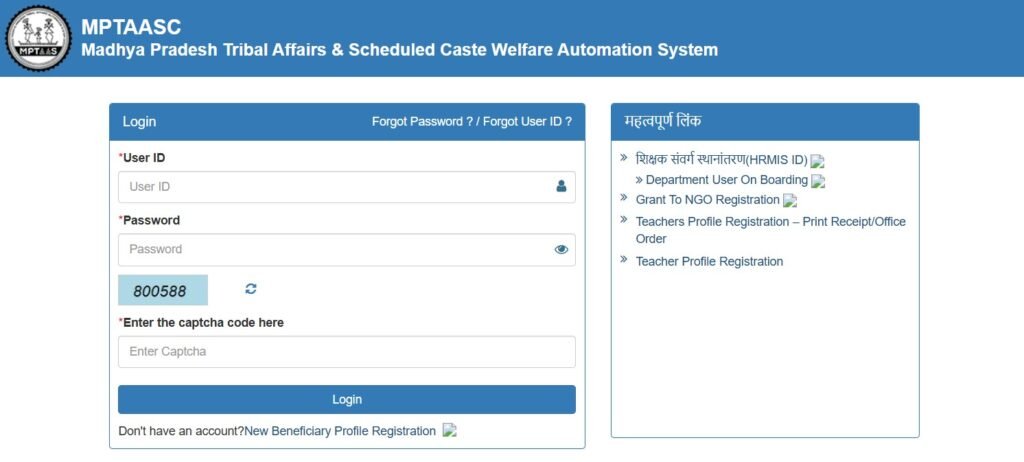
Start by visiting the official MPTAAS portal at tribal.mp.gov.in/mptaas. This is your main access point for registration, login, and status tracking.
Step 2: Login Using Your User ID and Password
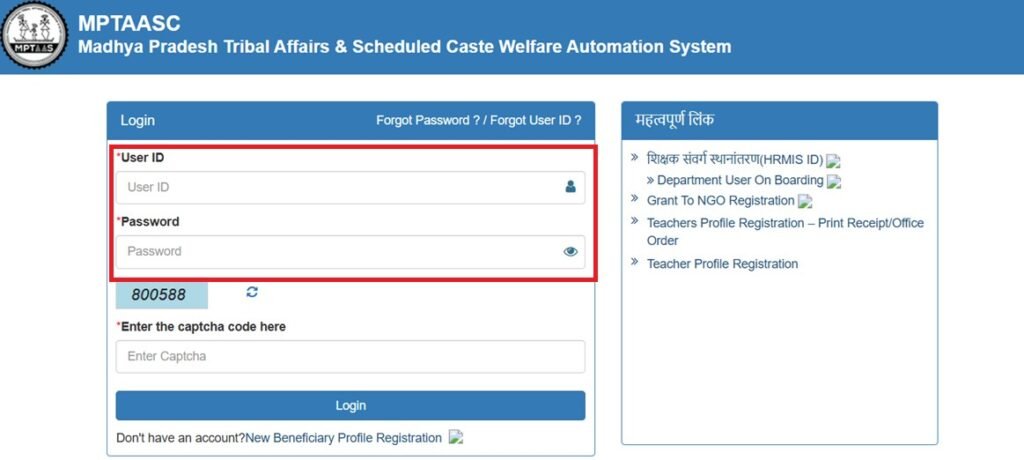
Use your User ID and password (generated during registration) to log in. If you haven’t registered yet, create a beneficiary profile first and complete e‑KYC with your Aadhaar.
Step 3: Open the “Application Status” Section in Dashboard
Once logged in, go to the PMS (Post Matric Scholarship) or “Application Status” area in your dashboard. This section gives a clear view of your application’s current state.
Step 4: Understand Different MPTAAS Scholarship Status Stages
The MPTAAS scholarship platform uses these common status labels:
- Disbursed – Funds have been transferred to your account
- Submitted – Your application is in and waiting for review.
- Under Review – Officials are verifying your documents.
- Approved – Your scholarship is confirmed.
- Rejected – Not approved—may need revision or reapplication.
- Pending / On Hold – More information or documentation required.
Step 5: Take Action Based on Your Status
- Submitted / Under Review: Keep checking regularly.
- Pending / On Hold: Upload required documents or clarify discrepancies.
- Rejected: Review the reason, correct, and reapply if eligible.
- Approved / Disbursed: Cross-check your bank account for scholarship funds—ensure Aadhaar is linked for DBT.
Summary Table
| Step | What to Do |
|---|---|
| 1. | Visit tribal.mp.gov.in/mptaas |
| 2. | Log in with User ID & Password |
| 3. | Go to PMS or Application Status |
| 4. | Interpret status (Submitted, Approved, etc.) |
| 5. | Act accordingly (update, wait, contact support) |
Pro Tips for Smooth Tracking of MPTAAS Scholarship
- Bookmark the login page to save time in future visits.
- Double-check document uploads and Indian language headers to avoid errors.
- Save your login credentials securely—especially your Samagra ID.
- If stuck, contact the helpline via the portal or look for support info on the MPTAAS site.
FAQ
You can check your scholarship status by visiting the official portal tribal.mp.gov.in/mptaas → logging in with your User ID & Password → and opening the Application Status section.
Generally, it takes 15–30 days after submission for the status to update, depending on document verification and approval timelines.
This usually means your application is awaiting verification or you need to upload missing documents. Log in to check the required updates.
Once your status shows “Disbursed”, check your linked bank account (DBT). Sometimes, it may take 2–3 working days for funds to reflect.
If your status is Rejected, check the reason given (wrong documents, income proof mismatch, etc.). Correct the issue and reapply in the next cycle.
No. To protect student data, you must log in with your User ID and password on the official portal to see your application details.
Can’t Log In to Check Your Status? Try This First
A locked-out login is one of the most common reasons students give up on checking their status altogether. Before assuming the portal is down, work through these in order.
- Forgotten User ID. Your User ID is usually the mobile number or email you registered with, not a separately generated code. Try your registered mobile number first.
- Forgotten password. Use the portal’s password reset option, which sends an OTP to your registered mobile. If that number is no longer active, you will need to visit your institution’s scholarship cell to update it before you can reset your login.
- OTP not arriving. Wait a few minutes before requesting again — repeated requests in quick succession sometimes get rate-limited by the SMS gateway rather than failing outright.
- Account shows as already registered. This usually means you (or your institution, during a batch upload) already created a profile earlier in the cycle. Search for that registration instead of creating a second one, since duplicate profiles complicate verification.
If none of these resolve it, your institution’s scholarship cell can look up your profile directly and tell you whether the issue is with your account or with the portal itself.
Checking Status for a Sibling or Family Member
Parents and older siblings often manage the application for younger students. You do not need a separate account to do this — log in with the student’s own User ID and password rather than your own, since the application is tied to the student’s Samagra ID. If you are tracking status for more than one child in the family, keep each one’s login details in a separate note, as mixing up credentials between siblings is a frequent source of confusion when checking status close to a deadline.

